
Which pages of a website has Google actually indexed? It sounds like a simple question, and Google does make it simple to answer… as long as the website has a manageable number of pages. Whether it’s yours, a competitor’s, or any other site you want to analyze.
Back in December 2022, this page held a Python script that scraped Google’s site: operator results and collected every URL.

It worked then. Until it didn’t: I tested it in 2026, and Google stopped answering after two pages (more on that below).
The good news: there are better ways. Which one you need depends on one question: is it your site, or someone else’s?
Your own website: ask Search Console
If the site is yours (or a client’s, with access), you don’t need to guess: Google tells you.
- Open Google Search Console → Indexing → Pages.
- Click View data about indexed pages.
- Click Export (top right) to download the list as a spreadsheet.
One limit: the report shows up to 1,000 URLs. For most small and medium sites, that’s everything. For bigger ones, it’s a sample.
Why the list on the spreadsheet differs from the results from the site: operator?
Keep in mind:
- the “
site:” operator is not a full list. Google says the operator doesn’t necessarily return every indexed URL, and its result counts are rough estimates. It’s a quick look, not an inventory. - Search Console is the official record of what Google has indexed for your property. It’s based on Google’s own index data, though the report usually lags by a few days.
- They answer slightly different questions.
- site: shows what Google chooses to display for that query right now (it may filter near-duplicates, for example),
- while Search Console shows the index status.
More than 1,000 pages? Use Python and the URL Inspection API
If your site has fewer than 1,000 pages, the export above is all you need. The scripts below are for bigger sites, or for when you want to know why some pages aren’t indexed.
Search Console’s API can check pages one at a time and tell you whether each is indexed: up to 2,000 checks a day per property. Feed it the URLs from your sitemap and you get the full picture, page by page.
Setup (once):
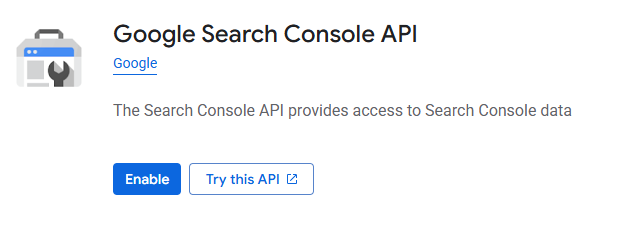
- Enable the API. In the Google Cloud Console, create a project (or pick an existing one). Go to APIs & Services → Library, search Google Search Console API, open it and click Enable. If it says “Manage” instead, it’s already on.
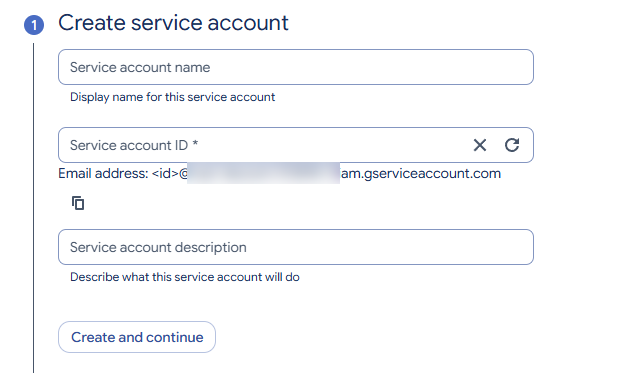
- Create a service account. Go to IAM & Admin → Service Accounts → Create service account, and fill it in like this:
- Service account name: something descriptive, e.g.
search-console-reader - Service account ID: fills itself in from the name, so leave it
- Description: optional, e.g. “Reads Search Console data for indexing checks”
- Click Create and continue. Skip the next two steps (roles and user access): just click Continue, then Done. The account needs no Google Cloud roles; its access comes from Search Console (step 4).
- Service account name: something descriptive, e.g.
- Create a key. In the list of service accounts, open the Actions menu (⋮) → Manage keys → Add key → Create new key → JSON. Save the file as
service-account.jsonnext to your script, and keep it private: it’s a key to your Search Console data.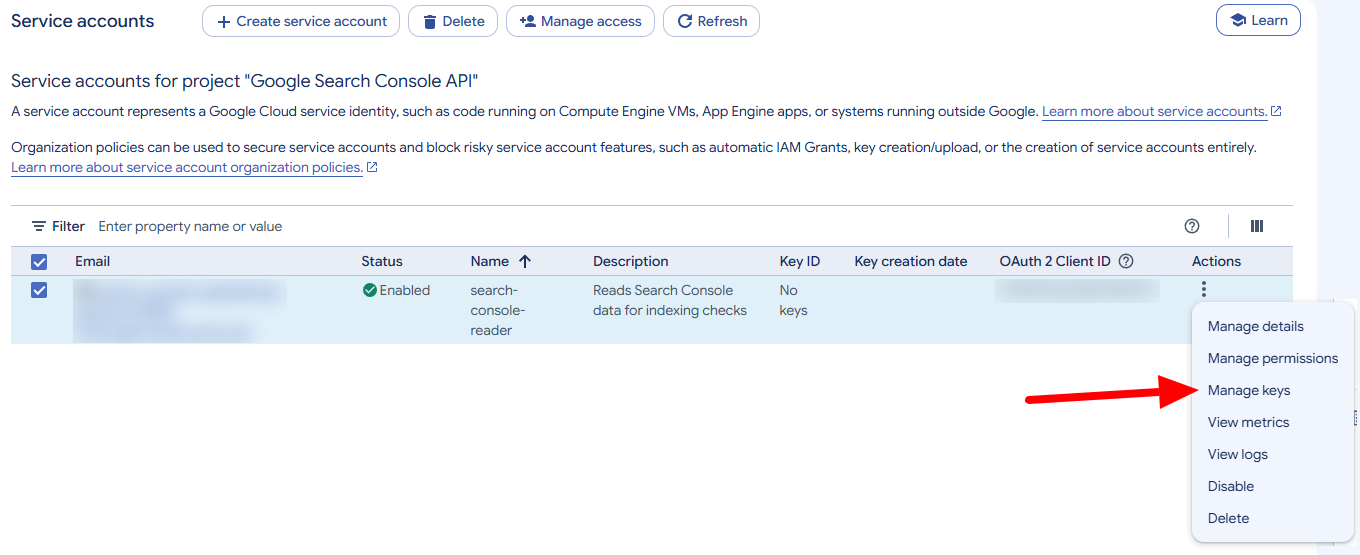
- Give it access. In Search Console → Settings → Users and permissions, add the service account’s email (
…@….iam.gserviceaccount.com) as a user with Restricted access. - Install the libraries:
pip install google-api-python-client google-auth requests
If you get a 403 error saying the API “has not been used in project… or it is disabled”, step 1 didn’t go through, or hasn’t taken effect yet. Open the link in the error, click Enable, and wait a few minutes.
import requests
import xml.etree.ElementTree as ET
from google.oauth2 import service_account
from googleapiclient.discovery import build

SITE = "https://jonathanseo.com/"          # your property, exactly as in Search Console
SITEMAP = "https://jonathanseo.com/sitemap_index.xml"

creds = service_account.Credentials.from_service_account_file(
    "service-account.json",
    scopes=["https://www.googleapis.com/auth/webmasters.readonly"],
)
gsc = build("searchconsole", "v1", credentials=creds)

ns = {"sm": "http://www.sitemaps.org/schemas/sitemap/0.9"}


def get_sitemap_urls(sitemap_url):
    """All page URLs in a sitemap, following sitemap indexes."""
    root = ET.fromstring(requests.get(sitemap_url).content)
    locs = [loc.text.strip() for loc in root.findall(".//sm:loc", ns)]
    if root.tag.endswith("sitemapindex"):
        return [url for sub in locs for url in get_sitemap_urls(sub)]
    return locs


urls = get_sitemap_urls(SITEMAP)
print(len(urls), "URLs found in the sitemap")

for url in urls:
    result = gsc.urlInspection().index().inspect(
        body={"inspectionUrl": url, "siteUrl": SITE}
    ).execute()
    print(url, "→", result["inspectionResult"]["indexStatusResult"]["coverageState"])
What the script does
- It logs in to Search Console with your service account.
- It reads every URL in your sitemap, following sitemap indexes like Yoast’s
sitemap_index.xmlinto each sub-sitemap. - For each URL, it asks Google: is this page indexed? And it prints Google’s answer: “Submitted and indexed”, “Crawled – currently not indexed”, “Discovered – currently not indexed”, and so on.
Now, please note the following:
Which question it answers: of the pages I want indexed, which ones has Google actually indexed, and why not the others?
Which question it doesn’t answer: what has Google indexed that isn’t in my sitemap? Old URLs, pages with parameters, tag archives, things you forgot about. The sitemap only knows what you told it.
Part two: find the pages you didn’t know Google had
Search Console’s API has another source: the Search Analytics data, the same as the Performance report. It lists every URL of your site that appeared in Google’s results in the last 16 months. A page that showed up in search is a page Google indexed, at least at the time.
So the complete version of the script:
- collects the URLs from your sitemap (what you want indexed);
- collects the URLs from Search Analytics (what Google has actually shown);
- merges the two lists and inspects every URL, noting where each one came from.
import datetime
import requests
import xml.etree.ElementTree as ET
from google.oauth2 import service_account
from googleapiclient.discovery import build

SITE = "https://jonathanseo.com/"          # your property, exactly as in Search Console
SITEMAP = "https://jonathanseo.com/sitemap_index.xml"

creds = service_account.Credentials.from_service_account_file(
    "service-account.json",
    scopes=["https://www.googleapis.com/auth/webmasters.readonly"],
)
gsc = build("searchconsole", "v1", credentials=creds)

ns = {"sm": "http://www.sitemaps.org/schemas/sitemap/0.9"}


def get_sitemap_urls(sitemap_url):
    """All page URLs in a sitemap, following sitemap indexes."""
    root = ET.fromstring(requests.get(sitemap_url).content)
    locs = [loc.text.strip() for loc in root.findall(".//sm:loc", ns)]
    if root.tag.endswith("sitemapindex"):
        return [url for sub in locs for url in get_sitemap_urls(sub)]
    return locs


def get_search_urls():
    """All URLs that got at least one impression in the last 16 months."""
    end = datetime.date.today()
    start = end - datetime.timedelta(days=486)   # about 16 months, Search Console's maximum
    urls, start_row = [], 0
    while True:
        response = gsc.searchanalytics().query(
            siteUrl=SITE,
            body={
                "startDate": start.isoformat(),
                "endDate": end.isoformat(),
                "dimensions": ["page"],
                "rowLimit": 25000,
                "startRow": start_row,
            },
        ).execute()
        rows = response.get("rows", [])
        urls += [row["keys"][0] for row in rows]
        if len(rows) < 25000:
            return urls
        start_row += 25000


sitemap_urls = set(get_sitemap_urls(SITEMAP))
search_urls = set(get_search_urls())
all_urls = sorted(sitemap_urls | search_urls)

print(len(sitemap_urls), "URLs in the sitemap")
print(len(search_urls), "URLs seen in Google search")
print(len(search_urls - sitemap_urls), "URLs in Google search but NOT in the sitemap\n")

for url in all_urls:
    source = ("sitemap + search" if url in sitemap_urls and url in search_urls
              else "sitemap only" if url in sitemap_urls
              else "search only")
    result = gsc.urlInspection().index().inspect(
        body={"inspectionUrl": url, "siteUrl": SITE}
    ).execute()
    state = result["inspectionResult"]["indexStatusResult"]["coverageState"]
    print(f"{url} → {state}  [{source}]")
How to read the output
- sitemap + search: all good. You want it indexed, and Google shows it.
- sitemap only: no impressions in 16 months. Check its index status: Google may be ignoring it, or it may just be too new.
- search only: Google knows a page your sitemap doesn’t. It could be an old URL, a redirect, a duplicate, or a page you forgot to add. These are the lines worth a closer look.
The final list: only the indexed pages
Now let’s answer the question this page is about. Instead of printing every status, keep only the URLs Google confirms as indexed. Replace the last loop of the script with this:
indexed = []
for url in all_urls:
    result = gsc.urlInspection().index().inspect(
        body={"inspectionUrl": url, "siteUrl": SITE}
    ).execute()
    status = result["inspectionResult"]["indexStatusResult"]
    if status.get("verdict") == "PASS":          # Google: this URL is indexed
        indexed.append(url)

print(len(indexed), "indexed pages:")
for url in indexed:
    print(url)
One honest caveat. No Google API simply hands you “all the pages in the index”. The URL Inspection API can only check URLs you give it. That’s why the script gathers every URL it can know about first: your sitemap, plus every page that appeared in search. The result is a list verified by Google, with one blind spot: a page that’s indexed, isn’t in your sitemap, and has never had a single impression. On a well-kept site, that’s rare.
Someone else’s website: what Google shows you
For a website you don’t own, Search Console is off the table: you need to verify your property and to do that you need access to the domain or the site. What’s left then? What’s left is what Google shows to everyone: the site: operator.
The site: operator, by hand
Search Google for site:example.com (no space after the colon) and you’ll see the pages Google has indexed for that domain (all of them? See just below). You can narrow it down too: site:example.com/blog/ shows only that section.
Keep in mind:
- It’s a sample, not an inventory. Google doesn’t promise to show every indexed page, and the result count at the top is a rough estimate.
- It works best on small sites. You can page through a few hundred results by hand; for thousands, it’s hopeless.
- Notice there’s a difference between
site:example.comandsite:www.example.com; the first one gives you also all subdomains pages indexed.
The old way: scraping it with Python (don’t do that)
The original version of this page automated exactly that: a Python script, using Selenium, opened site: results page by page and collected every URL. In December 2022 it worked.
In 2026 I tested it again, on this site. The automated browser collected 20 URLs, then on page 3 Google answered “no results”. The same search by hand, logged in, showed 52 URLs across 5 pages. Google recognizes automated browsers and stops serving them results.
There are ways to make a script look more like a real user, in other words, to make it work.
But scraping Google’s results goes against its terms of service, it can get your IP or Google account flagged, and every workaround breaks sooner or later. So I’ve removed the code. If you have a real need for this kind of data, get in touch and we’ll find a clean way to get it.
The middle way: a bookmarklet
You browse Google yourself, as a normal user; a small bookmark just collects the links from the page you’re looking at. No automated searches, no tricks: it’s copy-paste, only faster.
- Create a new bookmark in your browser, give it a name such as “Google site: collector” and paste this as its URL:
javascript:(()=>{const k='indexed-urls';const s=new Set(JSON.parse(localStorage.getItem(k)||'[]'));document.querySelectorAll('#rso a:has(h3)').forEach(a=>{if(a.href)s.add(a.href)});const l=[...s];localStorage.setItem(k,JSON.stringify(l));navigator.clipboard.writeText(l.join('\n')).then(()=>alert(l.length+' URLs collected and copied'),()=>alert(l.length+' URLs collected'));})(); - Search
site:example.comon Google and click the bookmark on each results page. - Each click adds that page’s links to the list and copies the whole list to your clipboard. On the last page, paste it into a spreadsheet.
To start a new list, create a second bookmark that clears the old one:
javascript:(()=>{localStorage.removeItem('indexed-urls');alert('List cleared');})();So, which method?
As mentioned, it depends on the “questions” we defined above: can you verify the property on Google Search Console? How big is the website?
Your own site, up to 1,000 pages
Export the list from Search Console. Three clicks, Google’s official answer. If the site is small enough, collect the site: results with the bookmarklet too and compare the two lists: they often differ, and the differences can point to pages that need fixing.
Your own site, bigger, or you want to know why pages aren’t indexed
Use the Python scripts and the URL Inspection API.
Someone else’s site
Use site: by hand, with the bookmarklet to collect the links. It’s an estimate, never the full list.
Scraping Google? Don’t
It breaks Google’s terms, and in 2026 it barely works anyway.
The question was simple, and the answer depends on whose site it is. At least now you know which door to knock on.